
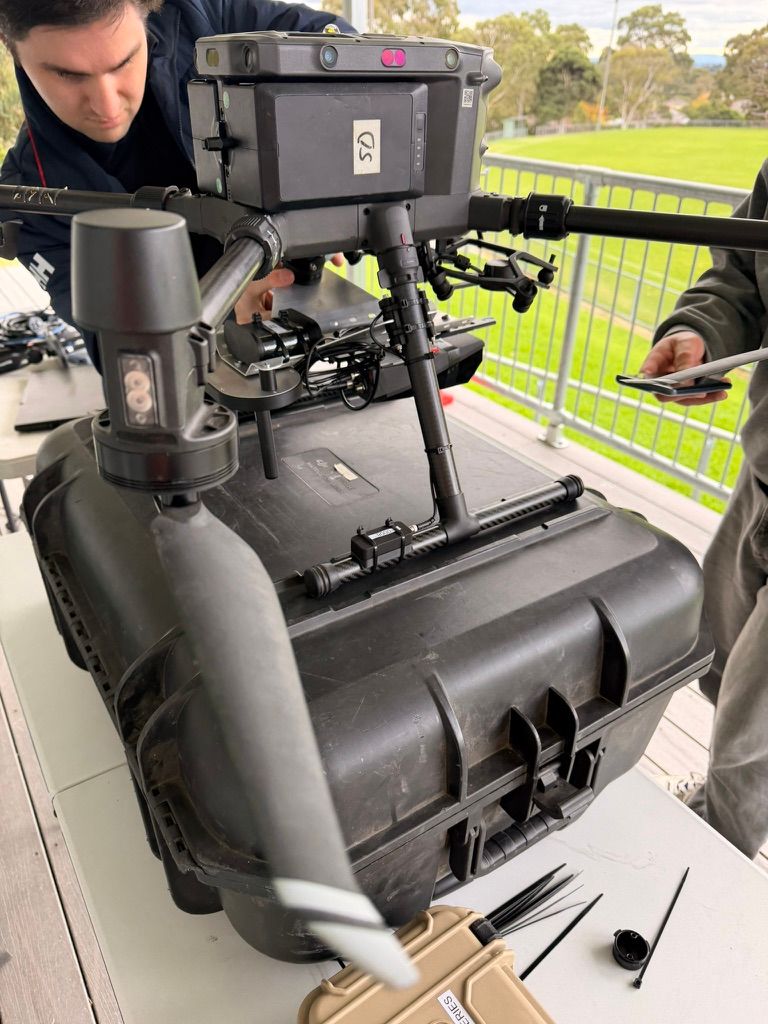
Professional drone operators use a documented maintenance routine: pre- and post-flight checks, scheduled propeller and motor inspections, battery care, controlled firmware updates and complete maintenance records. CASA expects commercial operators to keep maintenance records as part of safe operations, with specific technical-log requirements for ReOC operations. That discipline matters from the day you earn a drone licence in Australia, because it keeps your aircraft ready.
Meta description: Drone licence australia operators: build a safer maintenance routine for commercial flights. Book at aaa.edu.au or call 1300 336 366.
Short direct answer
A reliable maintenance routine is more than a quick look at the aircraft. It combines daily checks with scheduled servicing, careful battery handling, planned software changes and clear records. Follow the aircraft manufacturer’s instructions and your organisation’s procedures. If you find a defect that could affect safe flight, do not launch until it is assessed and resolved.
Why maintenance separates professionals from hobbyists
For a professional operator, the aircraft is work equipment and part of a safety system. A small crack, loose propeller or unexpected firmware change can affect a job, a client and people nearby. Routine checks help catch those issues before they become in-flight problems.
Hobbyists may rely on memory or check the aircraft only when something seems wrong. Professionals use repeatable steps. They note what they checked, record defects and know who can return an aircraft to service.
That does not mean every drone needs the same maintenance schedule. Instead, use the manufacturer’s instructions and the procedures for your operation. A small camera drone, an agricultural aircraft and a heavy-lift platform have different parts, use patterns and servicing needs.
At Ace Aviation, practical training builds maintenance awareness alongside piloting skills. We have trained over 4,000 students and support professional pathways across Australia, Singapore, Dubai, Korea and Malaysia. We also hold CASA.ReOC.1421. That provider status is not a substitute for an operator’s own approvals or responsibilities.
Explore Ace Aviation’s course options or learn how our training supports professional outcomes. Training is delivered in partnership with Reach Community College where relevant to the qualification.
Key facts: a practical drone maintenance routine
Use this table as a starting point, not a replacement for your aircraft manual or approved operator procedures. CASA does not set one universal inspection interval for every drone part.
| Item | What to check | How often | Why it matters |
|---|---|---|---|
| Propellers | Chips, cracks, bends, wear, correct fit and secure attachment | Before each flight; replace or inspect further as the manufacturer directs | A damaged or loose prop can cause vibration or loss of control |
| Motors | Smooth rotation, unusual sound, debris, heat signs and loose mounting | Before each flight; deeper inspection on the service schedule | Wear or contamination can affect lift and reliability |
| Airframe | Cracks, loose arms, damaged landing gear, fasteners and impact marks | Before and after flights; scheduled detailed checks | Structural damage can worsen under flight loads |
| Battery | Damage, swelling, connector condition, warnings and battery status | Before and after use; ongoing health checks per manufacturer | Damaged or poorly managed batteries may become unsafe |
| Firmware | Version, update notices, compatibility and successful system checks | Review on a planned basis, not automatically before a job | Uncontrolled changes can disrupt aircraft or controller behaviour |
| Sensors and gimbal | Obstructions, damage, calibration alerts and stable movement | Before a job; calibrate when required by the manufacturer or a warning | Sensor or gimbal issues can affect navigation and data quality |
| Logbook | Flight time, defects, maintenance, parts, firmware and serviceability status | Record events promptly; review before operations | Records support safe decisions, traceability and applicable compliance duties |
Step-by-step: checks before and after each flight
Use a written checklist that fits your aircraft and mission. Keep the same sequence each time. This makes omissions less likely when the crew is busy or working in a new location.

Before flight
- Check the work area and aircraft status. Confirm that the aircraft is the correct one for the task. Review its recorded serviceability and any open defects.
- Inspect the airframe. Look over arms, body, landing gear, fasteners, connectors and payload mounts. Check for cracks, loose parts or impact damage.
- Inspect each propeller. Look for chips, splits, deformation, dirt and loose fittings. Confirm correct orientation and installation.
- Check motors and moving parts. Look for debris, unusual resistance, damage or anything that differs from normal condition.
- Review batteries. Check for swelling, punctures, leaks, heat, damaged connectors or warnings. Use only batteries that meet the manufacturer’s requirements.
- Check sensors, gimbal and payload. Remove obstructions and check for damage or warnings. Make sure mounts and cables are secure.
- Review firmware and system alerts. Confirm the planned aircraft configuration. If an update has just occurred, perform the manufacturer’s checks and any required test before a client mission.
- Record and decide. Write down any defect or maintenance action. If a safety concern remains, ground the aircraft.
After flight
First, power down and handle the aircraft according to its manual. Then check for new damage, looseness, debris, unusual heat or signs of a hard landing. Inspect the propellers and motors again, especially after dusty, wet or demanding work.
Next, note flight time and any warnings or unusual handling. Record defects and battery status while details remain fresh. Clean and dry the aircraft using approved methods. Finally, secure it and its batteries for transport or storage. If the aircraft needs repair, label it clearly and prevent an accidental return to service.
Propeller and motor care
Propellers are easy to inspect, but small damage can be hard to spot in poor light. Rotate each blade under good lighting and check both surfaces and the hub. Do not assume a propeller is safe because the aircraft still powers on.
Never fly with a cracked, bent or noticeably chipped propeller unless the manufacturer specifically permits that condition. If the guidance is unclear, replace the propeller or seek qualified advice. Use the correct model and matching set. Mixing old and new propellers or different brands can create an unapproved setup.
For motors, look and listen for change. Check for grit, corrosion, unusual movement, rough rotation or a new sound. Do not force a motor that feels different. Follow the aircraft service instructions for cleaning, inspection and replacement. Log any work that could affect serviceability.

Battery health, storage and charging discipline
Battery care starts with inspection. Check the case, connectors and manufacturer app or display for warnings. A swollen, punctured, leaking or unusually hot battery should be removed from use and managed according to the manufacturer’s safety instructions. Do not charge or fly it just to see whether it still works.
Use the manufacturer’s charging equipment and guidance. Avoid charging unattended where prohibited by your procedures, and protect batteries from moisture, impact and extreme temperatures. For storage, follow the specified storage charge level. Many smart batteries have a storage function, but the correct approach depends on the battery and its manual.
Keep battery identification and condition traceable where your operation requires it. Record faults, quarantine decisions and replacement. Never set a universal service life based on a guess: age, use, care, storage and manufacturer limits all matter.

Firmware updates done safely
Treat firmware as a controlled maintenance change, not a casual app update. Review manufacturer release notes and compatibility advice first. Consider how the change may affect the aircraft, controller, payload, apps and established procedures.
Never update the night before a commercial job. Instead, schedule the change when you have time to check the aircraft and resolve issues. Update one aircraft at a time, keep a record of the version and date, and retain a known-good configuration where the manufacturer and your procedures allow. Afterward, verify the update and run the required system checks before returning the drone to service.
Maintenance schedule: daily, weekly, monthly and annual
Set intervals from manufacturer instructions and your organisation’s maintenance plan. Flight hours, operating conditions and aircraft type can change what is appropriate. The table below is a practical framework, not a CASA-wide schedule.
| Interval | Example actions |
|---|---|
| Daily / each flight | Pre-flight inspection; propeller, airframe, motor and battery checks; system alerts; post-flight inspection and defect reporting |
| Weekly | Review aircraft and battery records; clean and inspect equipment using approved methods; check accessories, cases and charging gear |
| Monthly | Review service due dates, repeated faults, firmware notices and battery condition; check logbook completeness and configuration records |
| Annual / manufacturer interval | Complete the required detailed inspection, servicing or component replacement; confirm schedule revisions and records; seek qualified maintenance support where needed |
City conditions can change the routine
The same checklist applies in every region, but the environment can expose different weaknesses. In Brisbane, heat and humidity make careful drying and storage important. In Perth, salt near coastal sites and dust near mine work can affect connectors and moving parts.
Melbourne operators may face changing weather during a workday, so secure transport and post-use drying matter. In Sydney, dense airspace adds planning pressure; keep equipment ready, but never rush an inspection to meet a slot. In Hobart, cold and moisture call for careful battery handling and dry storage. Always follow the equipment maker’s environmental limits.
Examples: how routine checks catch common failures
- A loose propeller: A pilot notices movement during the pre-flight check and stops. The crew fits the correct part, records the change and checks the aircraft before flight.
- Motor bearing wear: A new rough sound appears after a dusty job. The operator grounds the aircraft for inspection instead of treating the sound as normal.
- Cracked arm or storage damage: A drone shifts in an unprotected vehicle. A post-transport check finds an arm crack before the aircraft reaches the launch area.
- Swollen battery: A battery no longer sits flat in its case. The pilot removes it from service and follows the manufacturer’s quarantine guidance.
- Gimbal calibration drift: The camera horizon looks uneven or the system shows a warning. The operator checks the mount and follows the approved calibration procedure before collecting client data.
These examples show why findings should be recorded. A note helps the next pilot understand what changed and whether the aircraft is ready.
Common maintenance mistakes
Avoid these habits, even when a job is urgent:
- Updating firmware immediately before a commercial mission.
- Storing batteries fully charged or empty when the manufacturer specifies another storage state.
- Ignoring logbooks because the aircraft appears to fly normally.
- Flying with damaged propellers or combining unmatched propellers.
- Skipping a required gimbal or sensor calibration after a warning.
- Transporting equipment loose in a vehicle without suitable protection.
- Returning an aircraft to service before a defect has been checked and documented.
- Treating dust, moisture, salt or vehicle heat as harmless because the aircraft still powers on.
A simple rule helps: if a condition may affect safe operation, pause, assess it and record the outcome.
Drone Licence Australia Compliance: Records, Serviceability and Responsibility
CASA requirements depend on the operation and aircraft category. For a ReOC operation, the operator needs documented maintenance practices and procedures, and must use an aircraft that is serviceable and safe. Technical-log requirements apply to relevant operations and aircraft. The required details vary; for example, specific technical log items apply to RPA over 2 kg, with additional component time records for RPA over 25 kg.
A sound record system can include the aircraft identity, flight or component time, maintenance schedule, work performed, defects and rectification, firmware changes, service bulletins, next maintenance due and serviceability status. Some applicable technical-log records must be retained for seven years. Check the current rules and guidance for your operation.
Read CASA’s drone information and its specific ReOC record-keeping guidance. A broad overview page is not a replacement for the rules or your approved procedures. When uncertain, ask CASA or a qualified aviation compliance specialist.
Maintenance also supports client confidence. A client may never see a motor inspection, but clear records show that the operator has a process. Ace Aviation’s Altitude+ student benefits program and industry links support learning beyond initial training. Graduates can also explore the DroneWork industry and job board. Certificate III in Aviation options are delivered with Reach Community College where relevant.
Drone maintenance FAQ
1. Does CASA require drone maintenance records?
CASA requires maintenance documentation for applicable ReOC operations, and specific technical-log requirements apply to certain aircraft and operations. The details depend on the operation and aircraft category. Check current CASA guidance and your procedures. A professional operator should record defects, maintenance and serviceability decisions even when a particular record item is not required in every case.
2. How often should I check drone propellers?
Inspect propellers before every flight and after any impact, hard landing or demanding operation. Also follow the manufacturer’s scheduled inspection or replacement guidance. Look for cracks, chips, bends, wear, loose fittings and contamination. If you find damage or are unsure whether it is acceptable, do not fly until you have resolved the concern.
3. Can I fly with a small nick in a propeller?
Do not assume a small nick is safe. A nick may become a crack or alter the propeller’s condition under load. Follow the manufacturer’s guidance for that propeller. If it does not clearly allow the damage, replace it with the correct part. Never use a damaged propeller simply because the aircraft starts normally.
4. What charge level should I use for battery storage?
Use the storage level and process stated by the battery manufacturer. Some smart batteries offer a storage mode, while others require a specific procedure. Avoid leaving batteries at full charge or fully depleted when the instructions advise against it. Check stored batteries at the interval in your procedures and keep them away from heat and moisture.
5. How long do LiPo drone batteries last?
There is no reliable single lifespan for every lithium-polymer or smart battery. Service life depends on the model, age, use, charging, storage, temperature and manufacturer limits. Monitor condition and warnings, and follow any cycle, capacity or retirement limits provided for your battery. Do not keep using a battery that is damaged or flagged as unsafe.
6. What is the best practice for firmware updates?
Review the manufacturer’s release notes and compatibility instructions, then update during a planned maintenance window. Do not update the night before a commercial job. Record the aircraft, affected equipment, version and date. Update one aircraft at a time and complete the manufacturer’s checks or test flight before returning it to operational use.
7. Can I mix propeller brands or old and new propellers?
Use only the propellers specified for your aircraft and operating configuration. Mixing brands, models or condition can create an unapproved setup and may affect balance or performance. Replace propellers as directed by the manufacturer. If one propeller needs replacement, check whether the manufacturer requires a matched set or other specific installation steps.
8. How should I transport and store drones in cars?
Secure the aircraft in a suitable case or restraint so it cannot shift, press against loose items or be struck during travel. Protect batteries and follow their transport instructions. Avoid leaving equipment in a hot vehicle or exposed to rain, condensation or dust. After transport, inspect the drone for movement, impact damage and loose parts before flight.
9. How does humidity affect drone maintenance?
Moisture can contribute to corrosion, residue or electrical problems, especially around connectors and exposed components. In humid conditions, dry equipment using the manufacturer-approved method before storage. Do not seal damp gear in a case. Inspect for moisture or corrosion and follow the manual if the aircraft has been exposed to rain, spray or condensation.
10. Can maintenance void my drone warranty?
It can affect warranty coverage if you use unapproved parts, perform unauthorised repairs or fail to follow the manufacturer’s instructions. Warranty terms vary, so review the aircraft and battery documents before maintenance. Use authorised service channels when required. Keep records of work and parts, and ask the manufacturer or supplier if a proposed repair may affect coverage.
11. What maintenance tools should I carry?
Carry only tools suited to the aircraft and permitted by its manufacturer. A field kit may include approved cleaning materials, the correct propeller tools, spare specified parts, a torch and a checklist or digital record access. Do not improvise repairs with unsuitable tools. Keep any repair items organised and protect sensitive equipment from dust and moisture.
12. When should I replace drone motors?
Replace a motor when the manufacturer’s criteria or a qualified inspection indicates it is due, or when you find a fault that affects serviceability. Warning signs may include unusual noise, rough rotation, excessive play, heat or physical damage. Do not rely on sound alone. Record the finding and seek qualified support if the cause is uncertain.
13. What format should a drone maintenance logbook use?
A paper logbook or secure digital record can work if it captures the required information and remains clear, current and accessible. Record the aircraft identity, date, flight or component time where applicable, checks, defects, maintenance, parts, firmware changes and serviceability decision. For ReOC operations, check CASA’s required technical-log items and retention rules.
14. How often should I calibrate a drone gimbal?
Follow the manufacturer’s instructions and calibrate when the system requires it or when a relevant warning or performance issue appears. A gimbal should not be recalibrated automatically before every flight unless the manual or your procedure says so. Check the mount, cables and payload first. Record calibration or repair work where your maintenance system requires it.
15. Who is responsible for maintenance under a ReOC?
The ReOC holder must have suitable documented maintenance practices and procedures and ensure its aircraft are serviceable and safe. CASA guidance assigns maintenance oversight functions to the operator’s nominated Maintenance Controller. Pilots should report defects and follow procedures; they should not assume a drone is serviceable simply because another person last used it.
16. Can poor maintenance affect drone insurance?
Policy terms differ, so review your actual insurance wording and discuss questions with your insurer or broker. Insurers may ask about maintenance systems, records or compliance when assessing a claim. Good records can help show what checks and actions took place, but they do not guarantee cover. Keep aircraft serviceable and follow the policy and operating rules.
17. How can I spot a swollen drone battery?
Look for a case that bulges, does not sit flat or no longer fits its compartment normally. Also watch for leaks, punctures, unusual heat, damaged connectors or warnings. Do not squeeze, charge or fly a battery that appears swollen. Remove it from use and follow the manufacturer’s safety and disposal instructions.
18. How can I protect drone equipment from weather?
Check the aircraft’s stated environmental limits before operating. Use suitable cases, keep connectors clean and dry, and do not expose equipment to rain, spray, dust or extreme temperatures beyond the manufacturer’s guidance. After exposure, inspect and dry the aircraft as directed. Weather-resistant does not mean maintenance-free or suitable for every condition.
19. What should a drone pre-flight check cover?
A pre-flight check should cover aircraft identity and status, airframe, arms, propellers, motors, battery condition, connectors, payload, sensors, gimbal, firmware alerts and required system checks. It should also account for the mission and operating conditions. Use the aircraft manual and company checklist. Record defects, and do not launch with unresolved safety concerns.
20. When should I retire a drone airframe?
Retire an airframe when the manufacturer’s limits, an inspection or a qualified technical assessment shows it is no longer serviceable. Cracks, repeated structural damage, corrosion or a history of hard impacts may require investigation. Do not extend service life based on appearance alone. Record the retirement decision and prevent the aircraft from returning to use.
Summary
A professional maintenance routine is consistent, documented and matched to the aircraft. Check the drone before and after flights, manage batteries and firmware carefully, follow manufacturer instructions and record defects and work. Most importantly, ground equipment when you cannot confirm it is safe to fly.
Ace Aviation combines CASA-approved training with practical learning, a global footprint and ongoing student support. Our Altitude+ program and DroneWork network help connect training with industry pathways.
Ready to start? Book your training at aaa.edu.au or call 1300 336 366.
{“@graph”:[{“@id”:”https://aaa.edu.au/#organization”,”url”:”https://aaa.edu.au”,”name”:”Ace Aviation Aerospace Academy”,”@type”:”Organization”,”identifier”:”CASA.ReOC.1421″},{“@id”:”https://aaa.edu.au/#drone-maintenance-2026″,”@type”:”Article”,”image”:”https://cdn.marblism.com/f3yvCbfsurr.jpeg”,”author”:{“@id”:”https://aaa.edu.au/#organization”},”headline”:”Drone Licence Australia 2026: The Maintenance Routine That Keeps Professional Drone Pilots Flying”,”publisher”:{“@id”:”https://aaa.edu.au/#organization”},”inLanguage”:”en-AU”,”description”:”A practical guide to drone inspection, battery care, firmware control and maintenance records for professional drone operators in Australia.”,”dateModified”:”2026-10-24″,”datePublished”:”2026-10-24″,”mainEntityOfPage”:”https://aaa.edu.au”},{“@id”:”https://aaa.edu.au/#drone-maintenance-faq”,”@type”:”FAQPage”,”mainEntity”:[{“name”:”Does CASA require drone maintenance records?”,”@type”:”Question”,”acceptedAnswer”:{“text”:”CASA requires maintenance documentation for applicable ReOC operations, and specific technical-log requirements apply to certain aircraft and operations. The details depend on the operation and aircraft category. Check current CASA guidance and your procedures. A professional operator should record defects, maintenance and serviceability decisions even when a particular record item is not required in every case.”,”@type”:”Answer”}},{“name”:”How often should I check drone propellers?”,”@type”:”Question”,”acceptedAnswer”:{“text”:”Inspect propellers before every flight and after any impact, hard landing or demanding operation. Also follow the manufacturer’s scheduled inspection or replacement guidance. Look for cracks, chips, bends, wear, loose fittings and contamination. If you find damage or are unsure whether it is acceptable, do not fly until you have resolved the concern.”,”@type”:”Answer”}},{“name”:”Can I fly with a small nick in a propeller?”,”@type”:”Question”,”acceptedAnswer”:{“text”:”Do not assume a small nick is safe. A nick may become a crack or alter the propeller’s condition under load. Follow the manufacturer’s guidance for that propeller. If it does not clearly allow the damage, replace it with the correct part. Never use a damaged propeller simply because the aircraft starts normally.”,”@type”:”Answer”}},{“name”:”What charge level should I use for battery storage?”,”@type”:”Question”,”acceptedAnswer”:{“text”:”Use the storage level and process stated by the battery manufacturer. Some smart batteries offer a storage mode, while others require a specific procedure. Avoid leaving batteries at full charge or fully depleted when the instructions advise against it. Check stored batteries at the interval in your procedures and keep them away from heat and moisture.”,”@type”:”Answer”}},{“name”:”How long do LiPo drone batteries last?”,”@type”:”Question”,”acceptedAnswer”:{“text”:”There is no reliable single lifespan for every lithium-polymer or smart battery. Service life depends on the model, age, use, charging, storage, temperature and manufacturer limits. Monitor condition and warnings, and follow any cycle, capacity or retirement limits provided for your battery. Do not keep using a battery that is damaged or flagged as unsafe.”,”@type”:”Answer”}},{“name”:”What is the best practice for firmware updates?”,”@type”:”Question”,”acceptedAnswer”:{“text”:”Review the manufacturer’s release notes and compatibility instructions, then update during a planned maintenance window. Do not update the night before a commercial job. Record the aircraft, affected equipment, version and date. Update one aircraft at a time and complete the manufacturer’s checks or test flight before returning it to operational use.”,”@type”:”Answer”}},{“name”:”Can I mix propeller brands or old and new propellers?”,”@type”:”Question”,”acceptedAnswer”:{“text”:”Use only the propellers specified for your aircraft and operating configuration. Mixing brands, models or condition can create an unapproved setup and may affect balance or performance. Replace propellers as directed by the manufacturer. If one propeller needs replacement, check whether the manufacturer requires a matched set or other specific installation steps.”,”@type”:”Answer”}},{“name”:”How should I transport and store drones in cars?”,”@type”:”Question”,”acceptedAnswer”:{“text”:”Secure the aircraft in a suitable case or restraint so it cannot shift, press against loose items or be struck during travel. Protect batteries and follow their transport instructions. Avoid leaving equipment in a hot vehicle or exposed to rain, condensation or dust. After transport, inspect the drone for movement, impact damage and loose parts before flight.”,”@type”:”Answer”}},{“name”:”How does humidity affect drone maintenance?”,”@type”:”Question”,”acceptedAnswer”:{“text”:”Moisture can contribute to corrosion, residue or electrical problems, especially around connectors and exposed components. In humid conditions, dry equipment using the manufacturer-approved method before storage. Do not seal damp gear in a case. Inspect for moisture or corrosion and follow the manual if the aircraft has been exposed to rain, spray or condensation.”,”@type”:”Answer”}},{“name”:”Can maintenance void my drone warranty?”,”@type”:”Question”,”acceptedAnswer”:{“text”:”It can affect warranty coverage if you use unapproved parts, perform unauthorised repairs or fail to follow the manufacturer’s instructions. Warranty terms vary, so review the aircraft and battery documents before maintenance. Use authorised service channels when required. Keep records of work and parts, and ask the manufacturer or supplier if a proposed repair may affect coverage.”,”@type”:”Answer”}},{“name”:”What maintenance tools should I carry?”,”@type”:”Question”,”acceptedAnswer”:{“text”:”Carry only tools suited to the aircraft and permitted by its manufacturer. A field kit may include approved cleaning materials, the correct propeller tools, spare specified parts, a torch and a checklist or digital record access. Do not improvise repairs with unsuitable tools. Keep any repair items organised and protect sensitive equipment from dust and moisture.”,”@type”:”Answer”}},{“name”:”When should I replace drone motors?”,”@type”:”Question”,”acceptedAnswer”:{“text”:”Replace a motor when the manufacturer’s criteria or a qualified inspection indicates it is due, or when you find a fault that affects serviceability. Warning signs may include unusual noise, rough rotation, excessive play, heat or physical damage. Do not rely on sound alone. Record the finding and seek qualified support if the cause is uncertain.”,”@type”:”Answer”}},{“name”:”What format should a drone maintenance logbook use?”,”@type”:”Question”,”acceptedAnswer”:{“text”:”A paper logbook or secure digital record can work if it captures the required information and remains clear, current and accessible. Record the aircraft identity, date, flight or component time where applicable, checks, defects, maintenance, parts, firmware changes and serviceability decision. For ReOC operations, check CASA’s required technical-log items and retention rules.”,”@type”:”Answer”}},{“name”:”How often should I calibrate a drone gimbal?”,”@type”:”Question”,”acceptedAnswer”:{“text”:”Follow the manufacturer’s instructions and calibrate when the system requires it or when a relevant warning or performance issue appears. A gimbal should not be recalibrated automatically before every flight unless the manual or your procedure says so. Check the mount, cables and payload first. Record calibration or repair work where your maintenance system requires it.”,”@type”:”Answer”}},{“name”:”Who is responsible for maintenance under a ReOC?”,”@type”:”Question”,”acceptedAnswer”:{“text”:”The ReOC holder must have suitable documented maintenance practices and procedures and ensure its aircraft are serviceable and safe. CASA guidance assigns maintenance oversight functions to the operator’s nominated Maintenance Controller. Pilots should report defects and follow procedures; they should not assume a drone is serviceable simply because another person last used it.”,”@type”:”Answer”}},{“name”:”Can poor maintenance affect drone insurance?”,”@type”:”Question”,”acceptedAnswer”:{“text”:”Policy terms differ, so review your actual insurance wording and discuss questions with your insurer or broker. Insurers may ask about maintenance systems, records or compliance when assessing a claim. Good records can help show what checks and actions took place, but they do not guarantee cover. Keep aircraft serviceable and follow the policy and operating rules.”,”@type”:”Answer”}},{“name”:”How can I spot a swollen drone battery?”,”@type”:”Question”,”acceptedAnswer”:{“text”:”Look for a case that bulges, does not sit flat or no longer fits its compartment normally. Also watch for leaks, punctures, unusual heat, damaged connectors or warnings. Do not squeeze, charge or fly a battery that appears swollen. Remove it from use and follow the manufacturer’s safety and disposal instructions.”,”@type”:”Answer”}},{“name”:”How can I protect drone equipment from weather?”,”@type”:”Question”,”acceptedAnswer”:{“text”:”Check the aircraft’s stated environmental limits before operating. Use suitable cases, keep connectors clean and dry, and do not expose equipment to rain, spray, dust or extreme temperatures beyond the manufacturer’s guidance. After exposure, inspect and dry the aircraft as directed. Weather-resistant does not mean maintenance-free or suitable for every condition.”,”@type”:”Answer”}},{“name”:”What should a drone pre-flight check cover?”,”@type”:”Question”,”acceptedAnswer”:{“text”:”A pre-flight check should cover aircraft identity and status, airframe, arms, propellers, motors, battery condition, connectors, payload, sensors, gimbal, firmware alerts and required system checks. It should also account for the mission and operating conditions. Use the aircraft manual and company checklist. Record defects, and do not launch with unresolved safety concerns.”,”@type”:”Answer”}},{“name”:”When should I retire a drone airframe?”,”@type”:”Question”,”acceptedAnswer”:{“text”:”Retire an airframe when the manufacturer’s limits, an inspection or a qualified technical assessment shows it is no longer serviceable. Cracks, repeated structural damage, corrosion or a history of hard impacts may require investigation. Do not extend service life based on appearance alone. Record the retirement decision and prevent the aircraft from returning to use.”,”@type”:”Answer”}}]}],”@context”:”https://schema.org”}